
Below are several key updates, adjustments, and reminders to help ensure the team stays aligned and informed. If you have any further questions, feel free to comment below.
Each Week, Providers Should Review Encounters from the Previous Week for Completion
Each week providers should be review the encounters from the previous week. There are a couple of causes we have noticed that have created delays to encounters being closed out:
- A note has been added for a change or adjustment and no change has been made.
- The status of the encounter is different than Pending Sign Off
⚠️ Don't forget to save as Wrap Up when edit or adjustment is completed.
No-show Appointments
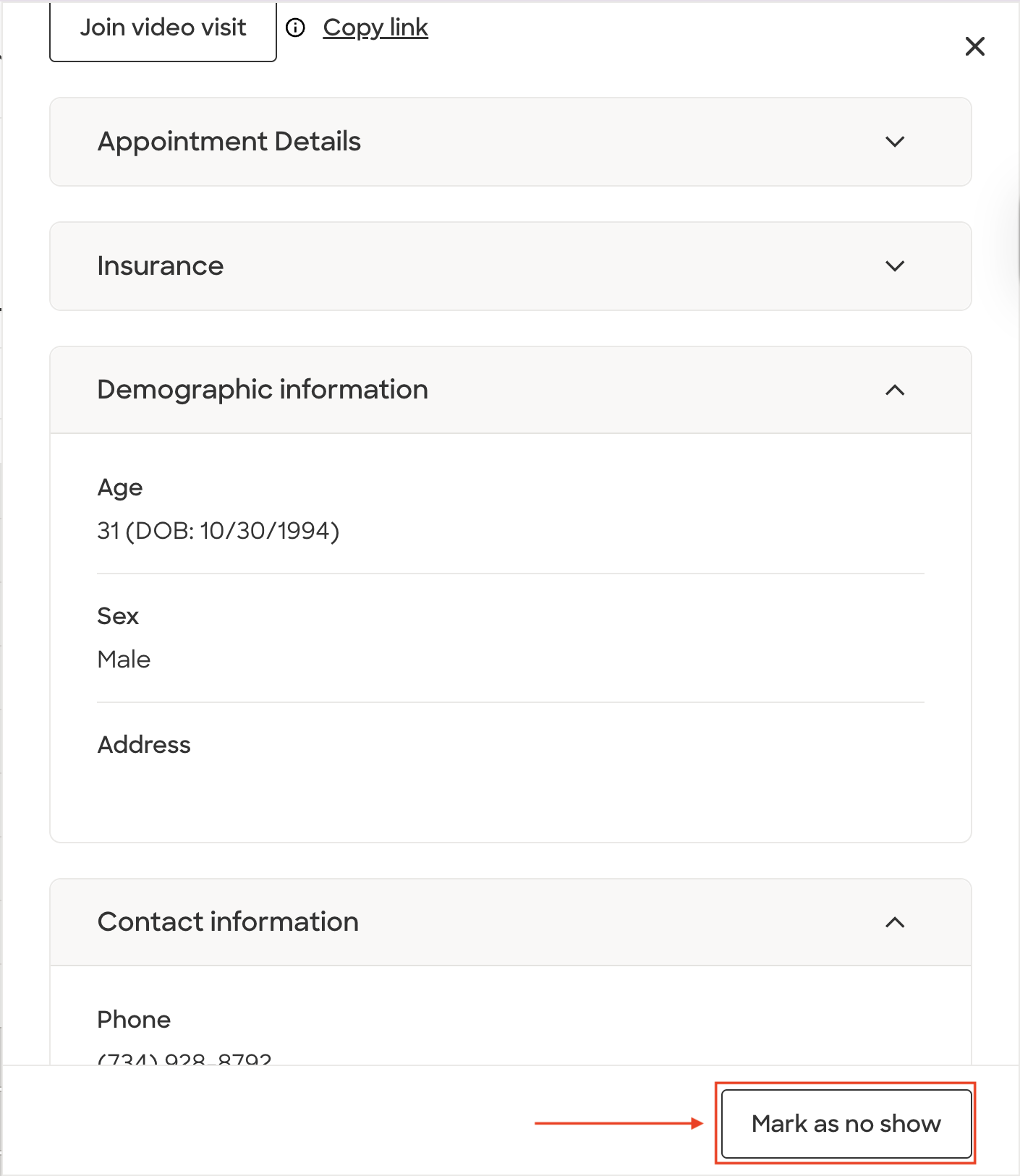
For all Patients that no-show their appointment, we need to mark them as a no-show on the different platforms. For the besa Health EHR, we automatically change the status of the visit to No Show if they do not enter the waiting room within 10 minutes of their appointment time. For visits that come through Zocdoc, we need to manually mark them as a no-show.
To do this, open the appointment > Scroll down to the bottom > and click Mark as no show
AI Scribe is inaccurate
There are times when the AI scribe will present inaccurate or missing information. To help us work towards making the scribe as accurate and detailed as possible, when providers experience this, we ask them to do the following:
- Correct the encounter note so that the information is accurate. Don't just accept it and move on as it is a completed encounter note.
- Send a message to Provider Support with an explanation as to what may have been inaccurate, along with the Patient ID.
With the help of providers using our platform in real-world situations, we'll be able to continue to optimize workflows and ultimately create an incredible tool that helps us better care for Patients.
Order Status
When creating an order, the status will automatically be Draft. This is to help ensure everything has been finished before the Patient receives a notification and a task in their app (On status Pending). The draft status is to be used as a placeholder for what may still need to be done. Here are the requirements depending on the order type:
- Task - Nothing required. Tasks can be created and added to Pending status.
- Labs - Labs should be in draft until the order reference number has been added to the order note. Then it can be changed to Pending status.
- Images - Images should be in draft until the image order has been placed successfully. In the case of Radnet, make sure to select "Email patient appointment link"
- Medication - Medications should be in draft until the prescription has been sent to their local pharmacy. For South Gate Rose delivery prescriptions, the status will be Pending. Please note, we will be providing all providers with login credentials to send eRx orders.
- Referral - Referrals should always be in draft. These orders will not move to pending until the Patient has received the referred provider and the referred provider has received the Patient's info.
Follow-Up Appointments
It is important that Providers schedule the follow-up appointment while in the encounter with the Patient. Oftentimes, the provider is the only person the Patient feels comfortable with until they get used to their care manager, and in some cases, is the only person the Patient is in contact with.
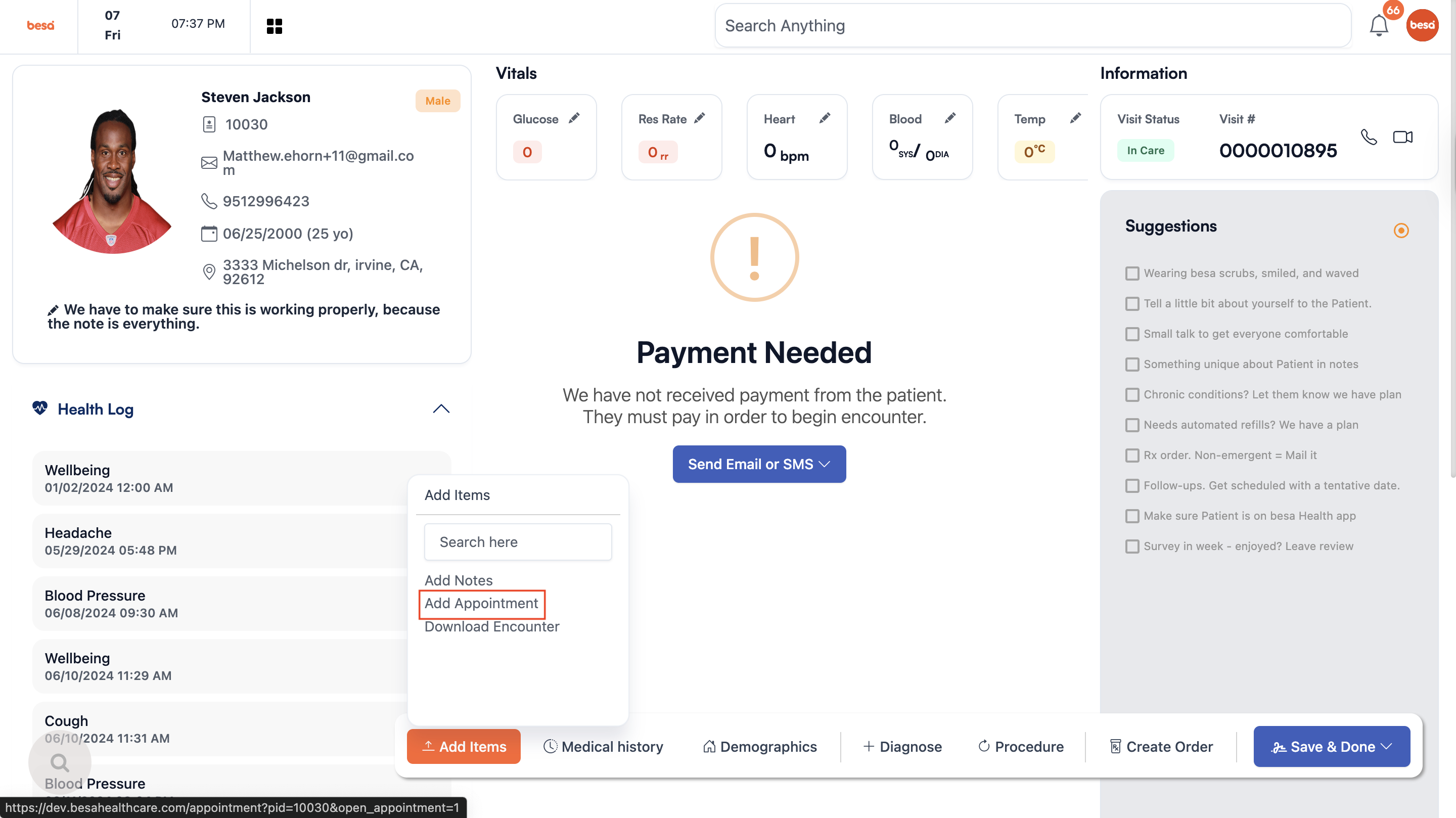
The quickest way to schedule an appointment would be to select the + Add Item button and click on Add Appointment. A new tab will open with the calendar. The follow-up appointment should be within one month.
Comments (0)