
This consolidated guide brings together PCAC contacts, Aerial workflows, eligibility rules, referrals, claims, urgent care, vision routing, and Annual Health Assessment documentation for BESA Health Medical Group providers.
Use this guide as the starting point for PCAC workflows.
Confirm time-sensitive information directly with PCAC or the applicable health plan. The urgent care directory is subject to change, and Aerial eligibility may not be the most current record.
What This Guide Covers
- PCAC contacts, laboratory routing, claim submission, provider contracting, and county-level health plan participation.
- Aerial account registration, login, eligibility, membership lists, referrals, claim status, and browser troubleshooting.
- Eligibility verification rules and health plan phone and portal references.
- Urgent care centers by county and vision network routing by health plan.
- The complete Annual Health Assessment (AHA) documentation checklist, including quality measures, PHQ-9, histories, examination fields, and coding status.
Quick Contacts and Routing
| Resource | Use | Contact |
|---|---|---|
| Customer/provider line | Member services, authorization and claim status, portal support | (657) 465-3500 | Monday-Friday, 8:30 a.m.-5:00 p.m. |
| Aerial support | Portal access and technical support | aerialsupport@unilogichealthcare.com | (657) 465-3500 |
| Provider Relations | Training and provider relationship support | providerrelations@unilogichealthcare.com | Select option 3 for portal support |
| Contracting | Demographic updates, add/remove physicians, letters of interest | contracting@unilogichealthcare.com | Fax: (657) 298-1867 |
| Quality Incentives and Coding | AHA, coding/risk adjustment, outreach, reimbursement, Cozeva | qualityincentives@unilogichealthcare.com |
| Utilization Management | Routine and urgent referral fax | (657) 413-4110 |
Laboratory Services
Send PCAC patients who need laboratory services to Quest Diagnostics.
| Laboratory | Support | Website |
|---|---|---|
| Quest Diagnostics | (866) 697-8378 | questdiagnostics.com |
Claims Submission
| Method | Destination | Details |
|---|---|---|
| Electronic | Office Ally | Payer ID: PCACZ | Support: (866) 575-4120 | officeally.com |
| Unilogic Healthcare Management | P.O. Box 1330, Los Alamitos, CA 90720 |
PCAC accepts electronic claim submissions and maintains the listed post office box for claims and general mail.
Participating Health Plans by County
| County | Health Plans |
|---|---|
| Los Angeles | Alignment Health Plan; Anthem Blue Cross; Astiva Health; Blue Shield Senior; Central Health Plan; Clever Care Health Plan; Health Net; Humana Health Plan; Imperial Health Plan; SCAN Health Plan; UCLA Health; Wellcare |
| Orange, Riverside, and San Bernardino | Alignment Health Plan; Anthem Blue Cross; Astiva Health; Central Health Plan; Clever Care Health Plan; Health Net; Humana Health Plan; Imperial Health Plan; Wellcare |
| San Diego | Alignment Health Plan; Anthem Blue Cross; Astiva Health; Blue Shield; Central Health Plan; Clever Care Health Plan; Health Net; Imperial Health Plan; SCAN Health Plan |
| Ventura | Central Health Plan; Imperial Health Plan |
Aerial Provider Portal
Aerial is PCAC's secure, password-protected provider portal. It supports member eligibility, referral requests and status, claim status, and printing explanations of benefits (EOBs).
Provider portal: aerial.carecoordination.medecision.com
Education and Training
PCAC offers telephone and one-on-one Aerial support. Schedule a demonstration by emailing providerrelations@unilogichealthcare.com or calling (657) 465-3500 and selecting option 3 for Provider Portal Support.
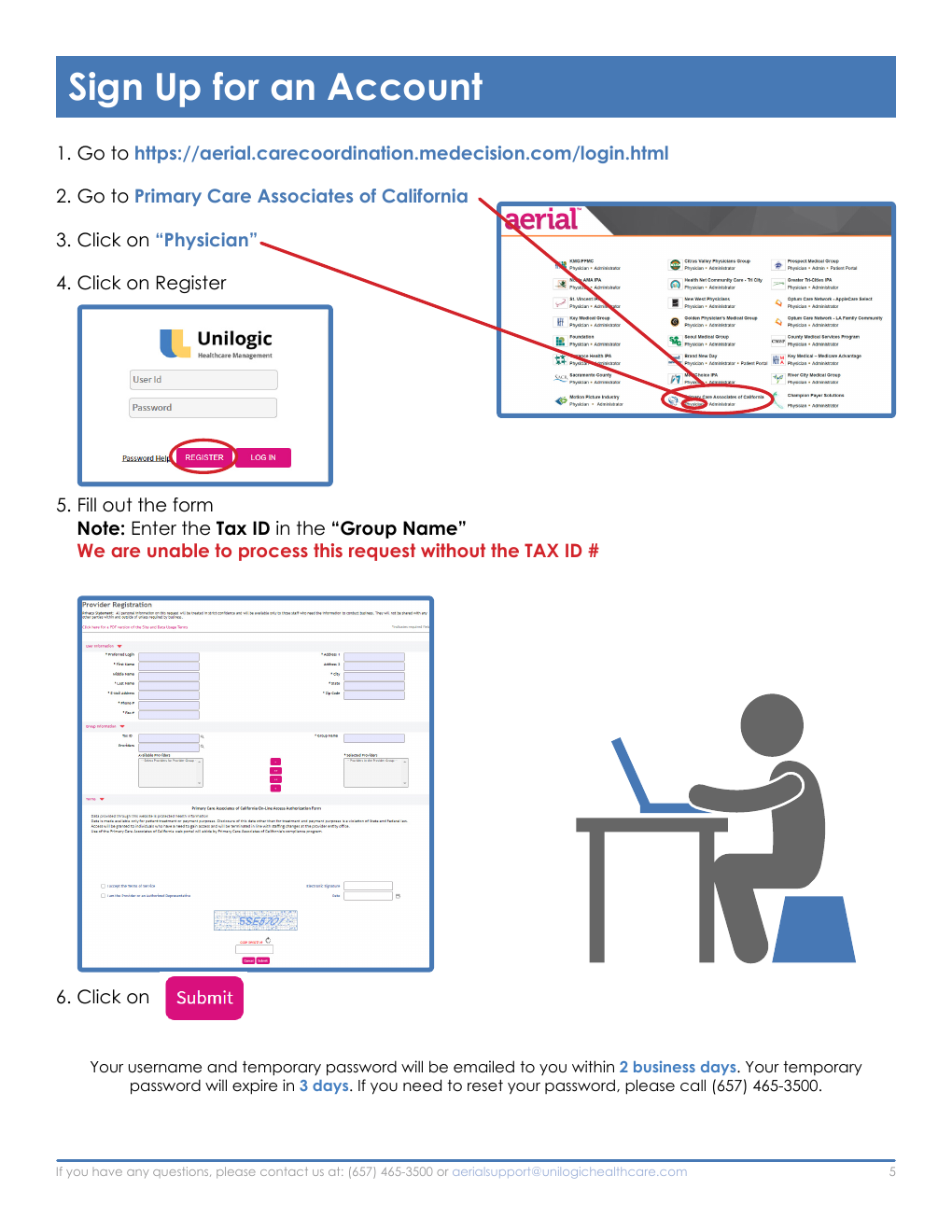
Register for an Aerial Account
- Open https://aerial.carecoordination.medecision.com/login.html.
- Select Primary Care Associates of California.
- Select Physician.
- Select Register.
- Complete the registration form. Enter the practice Tax ID in the Group Name field. PCAC cannot process the request without the Tax ID.
- Select Submit.
Account timing
The username and temporary password are emailed within two business days. The temporary password expires after three days. For a reset, call (657) 465-3500.
Visual Reference: Aerial Account Registration
Source screenshot: PCAC Aerial Provider Handbook (September 2025).
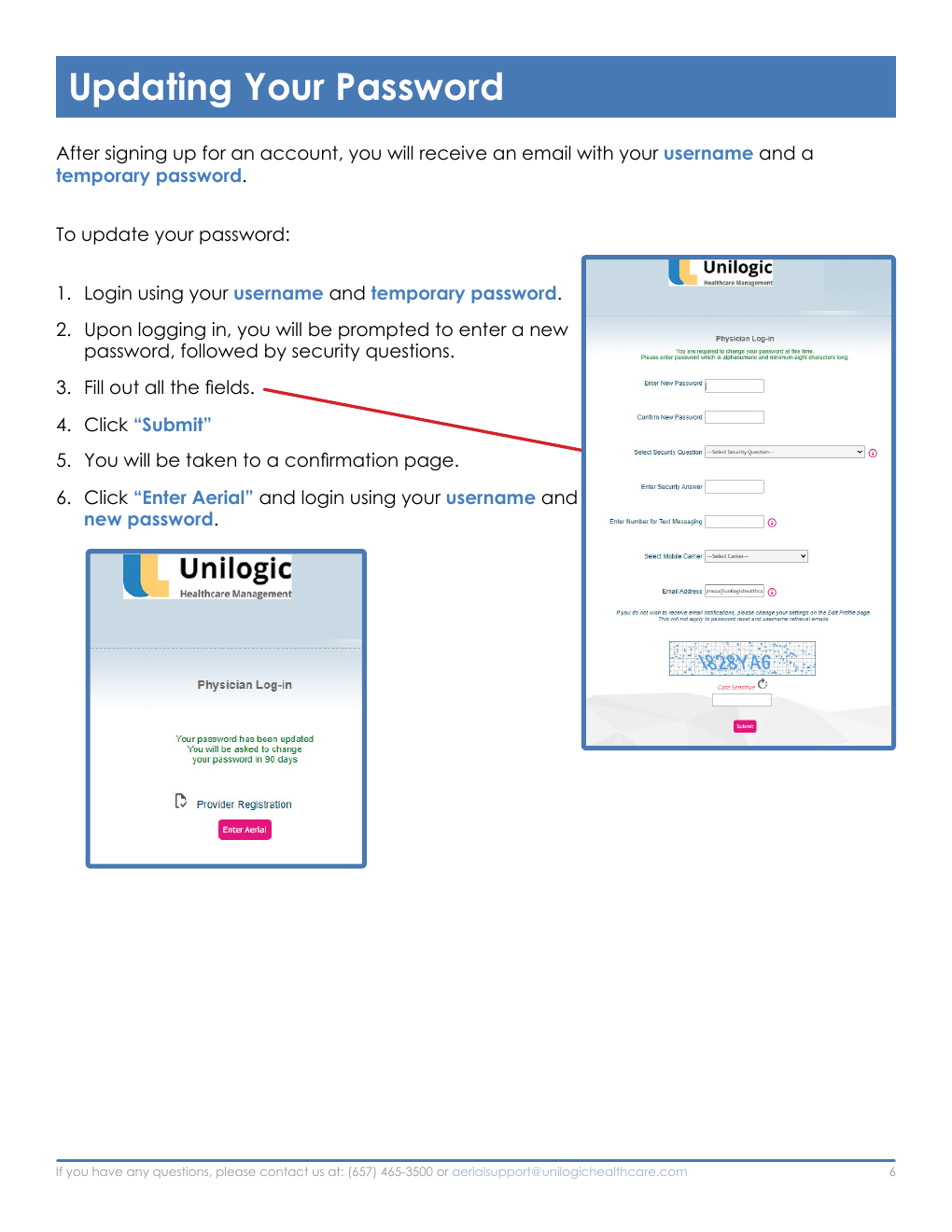
Update the Temporary Password
- Log in with the username and temporary password.
- When prompted, enter a new password and complete the security questions.
- Complete every field and select Submit.
- On the confirmation page, select Enter Aerial.
- Log in again with the username and new password.
Visual Reference: Updating the Temporary Password
Source screenshot: PCAC Aerial Provider Handbook (September 2025).
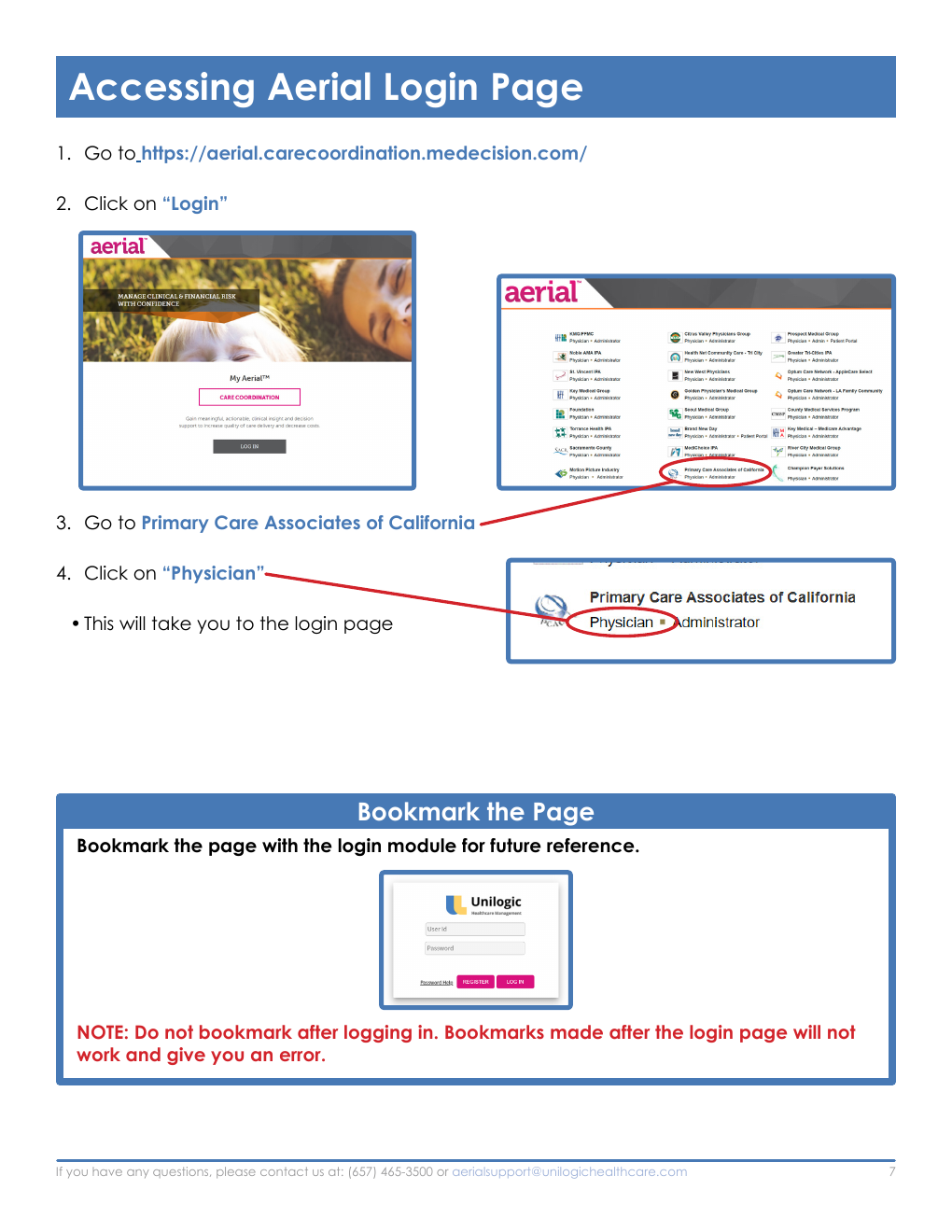
Open and Bookmark the Login Page
- Open https://aerial.carecoordination.medecision.com/.
- Select Login.
- Select Primary Care Associates of California.
- Select Physician to reach the login page.
- Bookmark the page that contains the login module.
Bookmark warning
Do not create the bookmark after logging in. A bookmark created inside the authenticated portal will not work and will produce an error.
Visual Reference: Opening and Bookmarking the Login Page
Source screenshot: PCAC Aerial Provider Handbook (September 2025).
Eligibility and Membership
Eligibility Verification and Payment Guarantee
Aerial eligibility data may not always be current. Verify eligibility directly with the applicable health plan before services are rendered, and review the patient's current insurance card for the assigned PCP and IPA affiliation at each visit.
To preserve the eligibility guarantee, verify with the health plan on the date of service and retain evidence:
- For portal verification, save a screenshot of the eligibility result.
- For telephone verification, document the health plan representative's name, the date and time, and the tracking number.
- If eligibility later changes, provide the documentation to the IPA. The IPA will address the discrepancy directly with the health plan, with no retroactive capitation or claims deduction.
Authorization dependency
Authorizations are valid for 60 days only and remain contingent on current eligibility. The rendering provider's office must verify eligibility and authorization validity on the date of service.
| Health Plan | Eligibility Phone | Portal |
|---|---|---|
| Alignment | (888) 517-2247 | alignmenthealthplan.com/providers |
| Anthem Blue Cross | (800) 676-2583 | anthem.com/provider |
| Astiva Health | (833) 300-0910 | astivahealth.com/en-us/provider-login |
| Blue Shield 65 and Choice | (877) 654-6500 | blueshieldca.com/provider |
| Central Health Plan | (866) 314-2427 | centralhealthplan.com/cpa/ |
| Clever Care Health Plan | (833) 388-8168 | eznet.clevercarehealthplan.com/EZ-NET60/Login.aspx |
| Health Net | (888) 926-4988 | provider.healthnetcalifornia.com |
| Humana | (800) 448-6262 | humana.com/provider/medical-resources/self-service-portal |
| Imperial Health Plan | (800) 830-3901 | providerportal.imperialhealthplan.com/login |
| SCAN Health Plan | (800) 559-3500 | secure-pportal.scanhealthplan.com |
| UCLA Health | (833) 627-8252 | uclahealthmedicareadvantage.org/healthlink-medicare-provider-portal |
| Wellcare | (866) 999-3945 | provider.wellcare.com/California |
Search for a Member
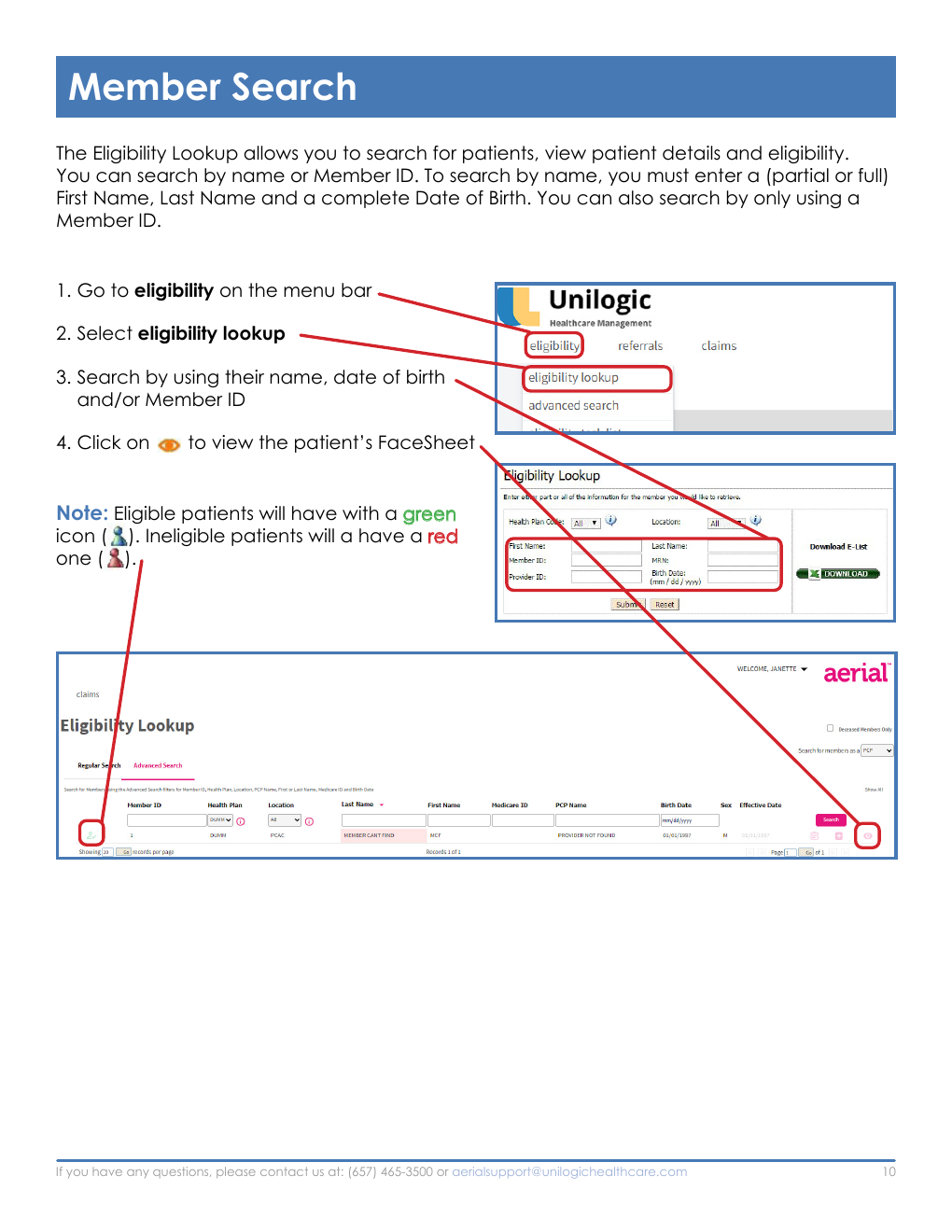
The Eligibility Lookup supports a name search or a Member ID search. A name search requires a partial or full first name, last name, and complete date of birth. A Member ID can be used by itself.
- Open Eligibility from the menu bar.
- Select Eligibility Lookup.
- Search by name and date of birth, or by Member ID.
- Select the eye icon to open the patient's FaceSheet.
A green icon indicates eligible status; a red icon indicates ineligible status.
Visual Reference: Member Search
Source screenshot: PCAC Aerial Provider Handbook (September 2025).
Patient FaceSheet
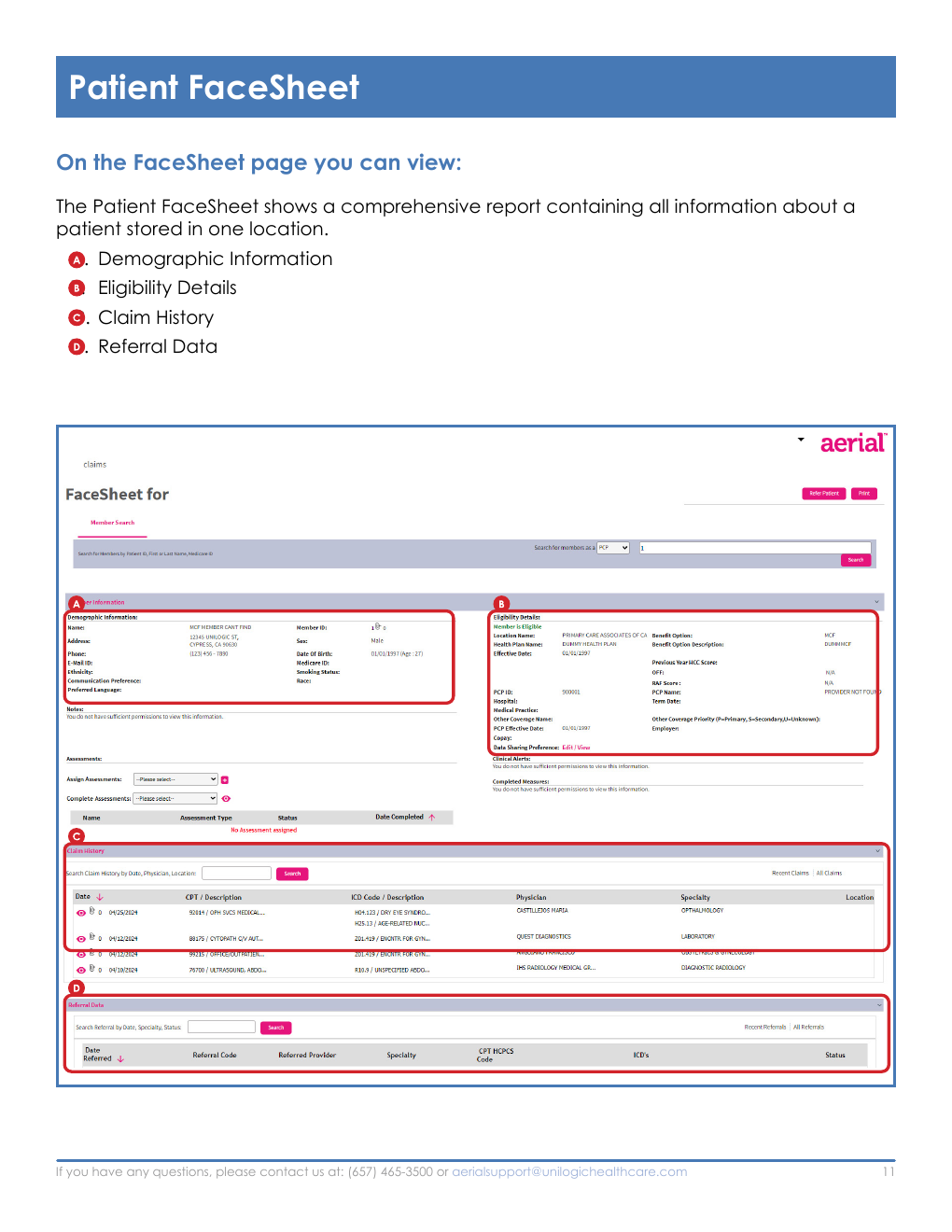
The FaceSheet is the consolidated patient record in Aerial. It displays demographic information, eligibility details, claim history, and referral data.
Visual Reference: Patient FaceSheet
Source screenshot: PCAC Aerial Provider Handbook (September 2025).
Submit a Member Inquiry
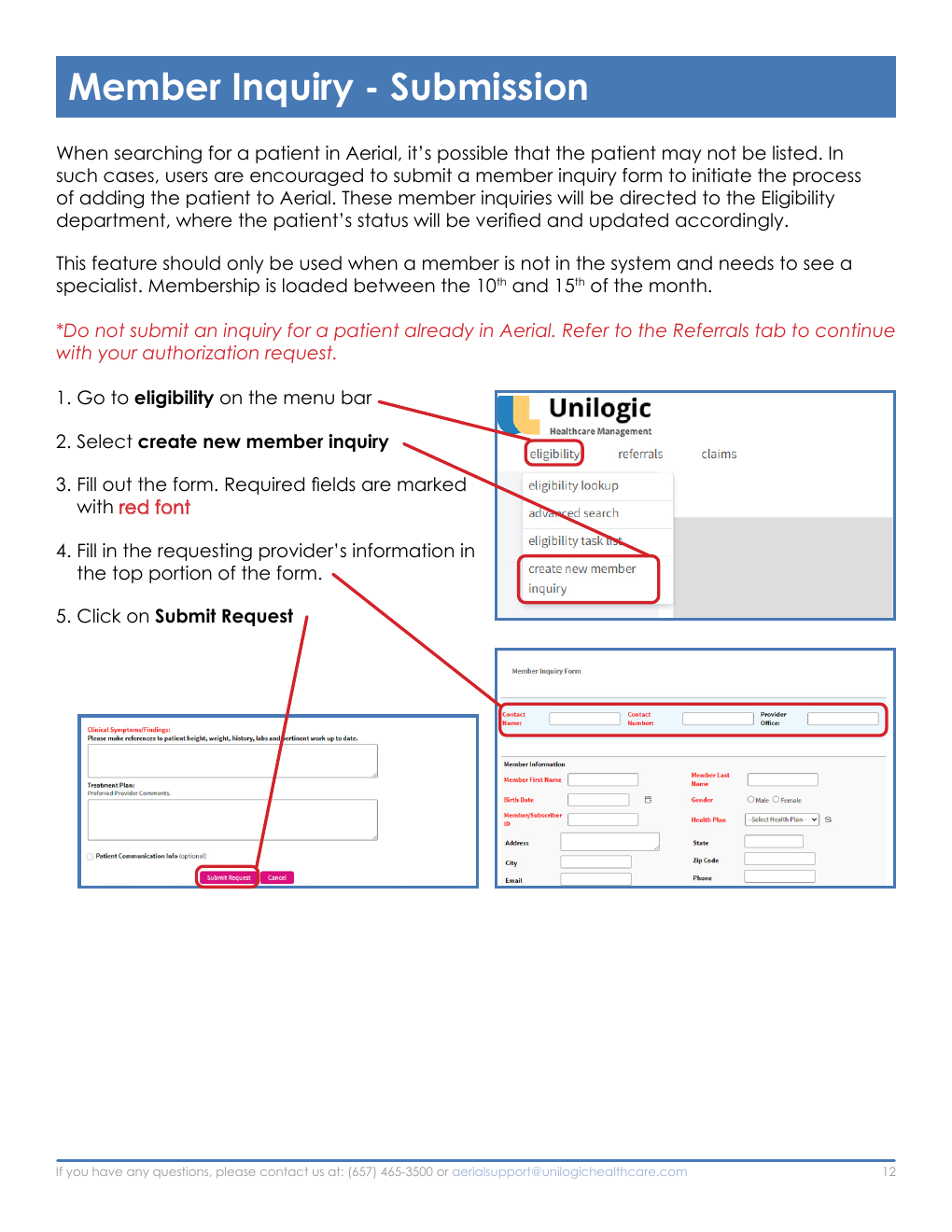
Submit a member inquiry only when the member is not already in Aerial and needs to see a specialist. Membership is loaded between the 10th and 15th of the month. If the patient is already present, use the Referrals tab for the authorization request.
- Open Eligibility from the menu bar.
- Select Create New Member Inquiry.
- Complete the form. Fields displayed in red are required.
- Enter the requesting provider's information in the top section.
- Select Submit Request.
Visual Reference: Member Inquiry Submission
Source screenshot: PCAC Aerial Provider Handbook (September 2025).
Check a Member Inquiry Update
- Open Eligibility from the menu bar.
- Select Eligibility Task List.
- Set Search By Status to All.
- Search by name, date, and ID number.
- Review Notes for the eligibility update.
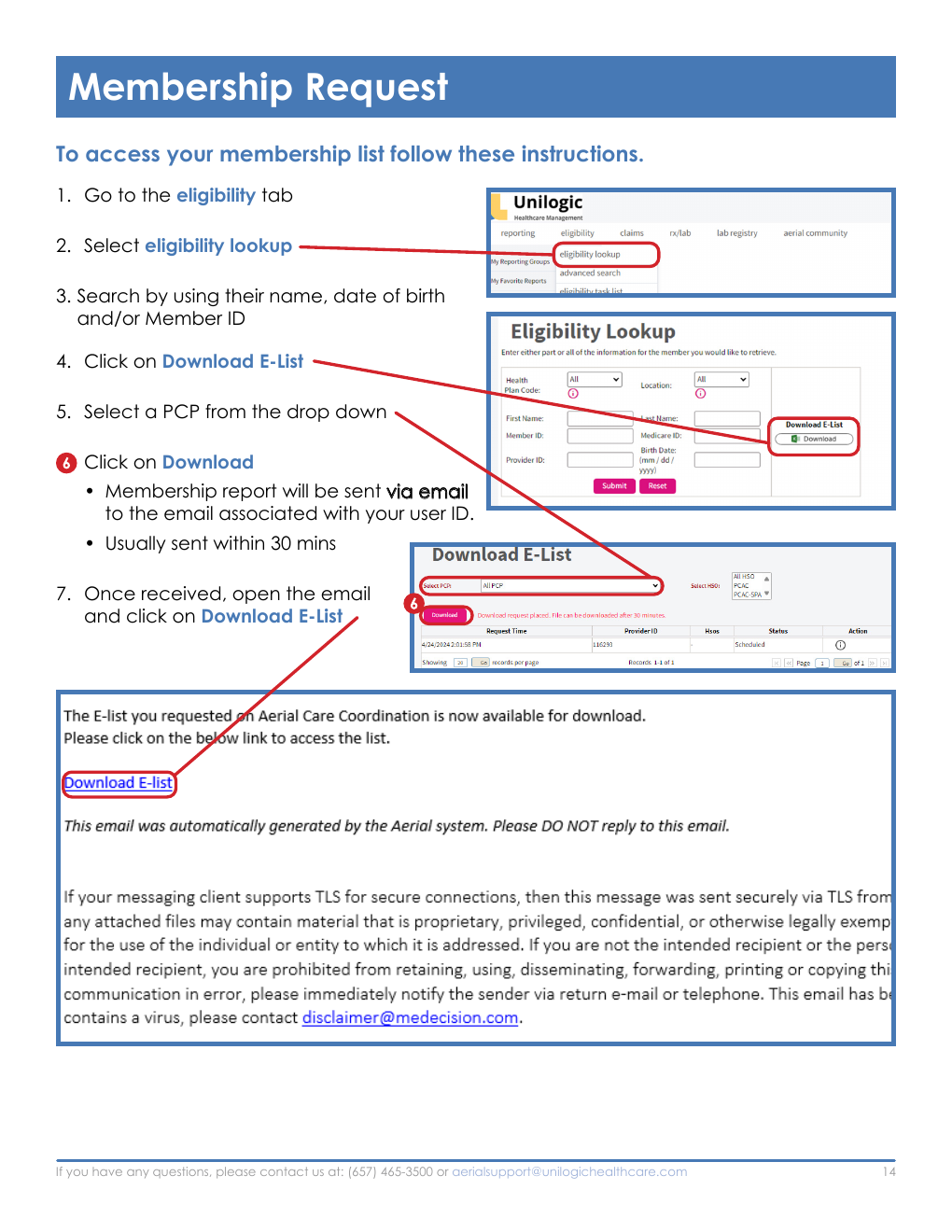
Download a Membership List
- Open the Eligibility tab and select Eligibility Lookup.
- Search by name, date of birth, and/or Member ID.
- Select Download E-List.
- Choose a PCP from the drop-down list.
- Select Download.
- Wait for the report email sent to the address associated with the Aerial user ID. It is usually delivered within 30 minutes.
- Open the email and select Download E-List.
Visual Reference: Downloading the Membership List
Source screenshot: PCAC Aerial Provider Handbook (September 2025).
Referrals and Authorizations
Medical Records Are Required
Include all relevant clinical documentation with every referral request. Complete records help PCAC process the request efficiently and select appropriate care.
If records are not received, the Medical Director may review without them and deny the request. Records submitted later may not support a new request; the physician may need to appeal through the health plan.
| Request Type | Decision Time |
|---|---|
| Standard/routine referral | Within 14 calendar days after receipt |
| Urgent referral | Within 72 hours after receipt, including weekends and holidays |
| Standard/routine Pharm B | Within 72 hours after receipt, including weekends and holidays |
| Urgent Pharm B | Within 24 hours after receipt, including weekends and holidays |
Time-sensitive definition
CMS defines a time-sensitive request as one where the standard decision time could seriously jeopardize the enrollee's life or health, or the ability to regain maximum function. If an urgent request does not meet that definition, PCAC will change it to routine and notify the member.
Submit an Online Referral
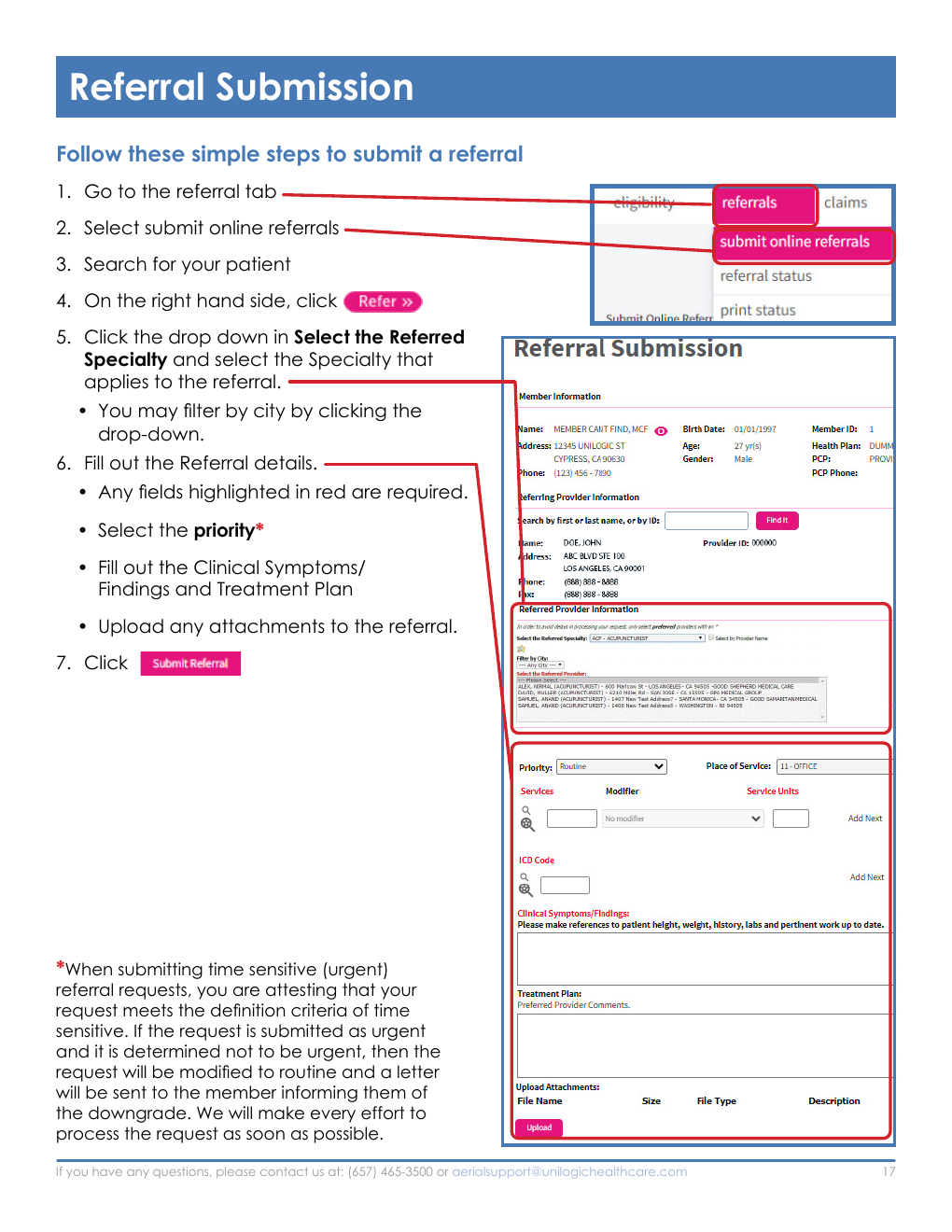
- Open the Referrals tab and select Submit Online Referrals.
- Search for the patient and select Refer on the right side.
- Choose the referred specialty. Use the city filter when helpful.
- Complete the referral details. Red fields are required.
- Select the priority, enter Clinical Symptoms/Findings and the Treatment Plan, and upload all supporting records.
- Select Submit Referral.
Visual Reference: Online Referral Submission
Source screenshot: PCAC Aerial Provider Handbook (September 2025).
When a Physician, Service, or Facility Is Not Found
For a physician, specialty, or service that is not listed - including durable medical equipment, home health agencies, or pharmacy:
- In Select the Referral Specialty, choose NA - Not Available.
- Enter the referring provider or service in the Treatment Plan Comments section.
For a hospital, ambulatory surgery center, or other facility that is not listed:
- Enter facility not found in the facility search.
- Select Find It.
- Enter the facility name in the Treatment Plan Comments section.
Pharmacy Referrals
For injectable or infused medications, select the applicable Pharm B priority so the request is routed to the correct decision timeline.
- Routine pharmacy authorization: select Routine pharm b in the Priority field.
- Urgent pharmacy authorization: select Urgent pharm b in the Priority field.
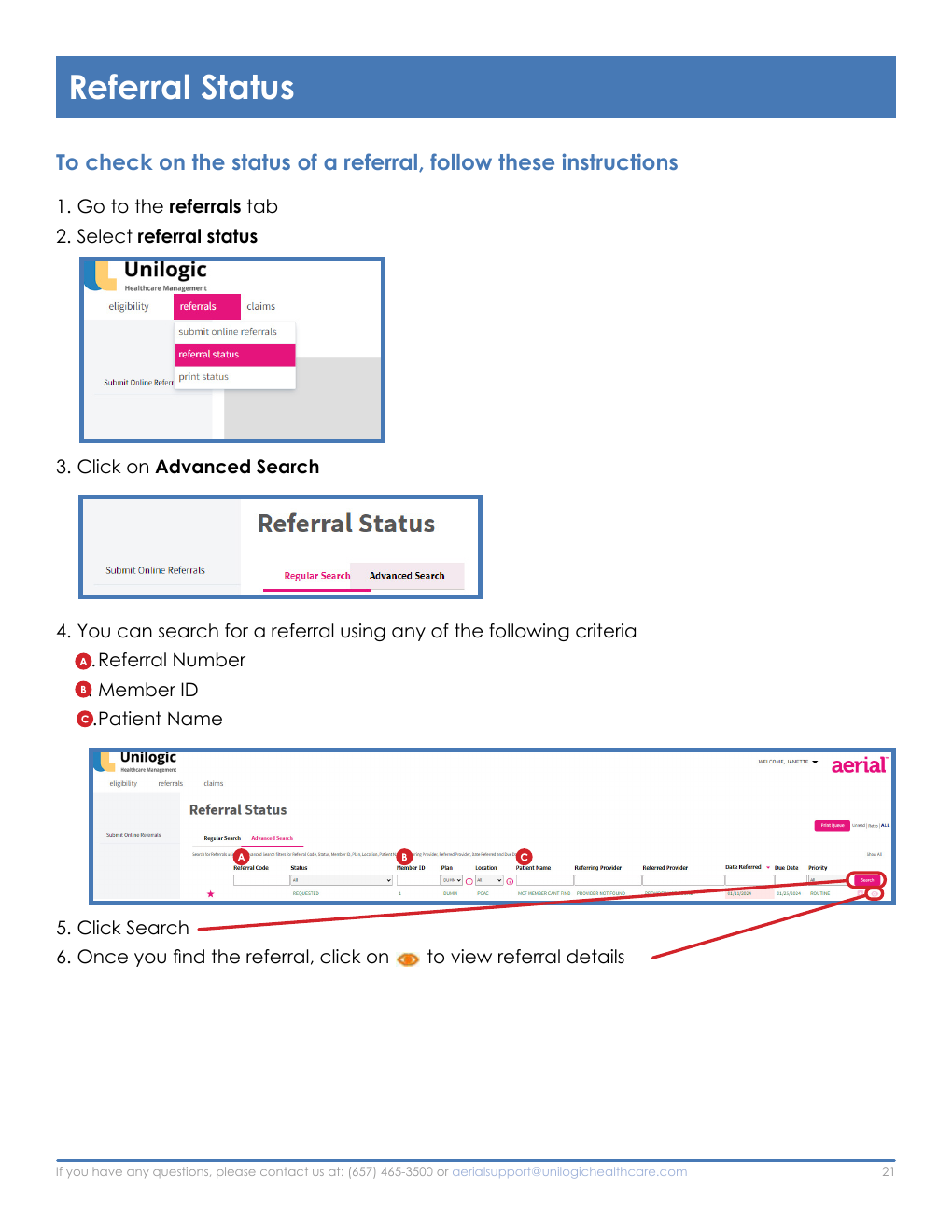
Check Referral Status and Details
- Open the Referrals tab and select Referral Status.
- Select Advanced Search.
- Search by referral number, Member ID, or patient name.
- Select Search.
- Select the eye icon to open the referral.
From Referral Details, staff can view status, print the referral, and submit modifications or comments.
Visual Reference: Referral Status Search
Source screenshot: PCAC Aerial Provider Handbook (September 2025).
Fax Referral Request Form
If online submission is unavailable, fax the completed referral request form to (657) 413-4110. The form captures:
- Today's date and request priority: urgent, routine, retroactive, or approved authorization.
- Patient name, date of birth, sex, health plan, health plan ID, phone, and full address.
- PCP and requesting physician/facility names, phone numbers, and fax number.
- Reason for referral: consult, follow-up, procedure, supply/DME, or testing.
- Place of service: doctor's office, home health, inpatient hospital, outpatient hospital, surgery center, or other.
- Primary diagnosis and ICD-10 codes plus requested CPT, RBRVS, or HCPCS codes.
- Last visit dates to the PCP and specialist, plus PCP and specialist signatures.
- Chart notes, test results, x-rays, laboratory results, consultation reports, and all relevant clinical information.
Referral form note
The referral must be to a contracted specialist. The source form identifies 99203 as the initial consultation code.
Claims in Aerial
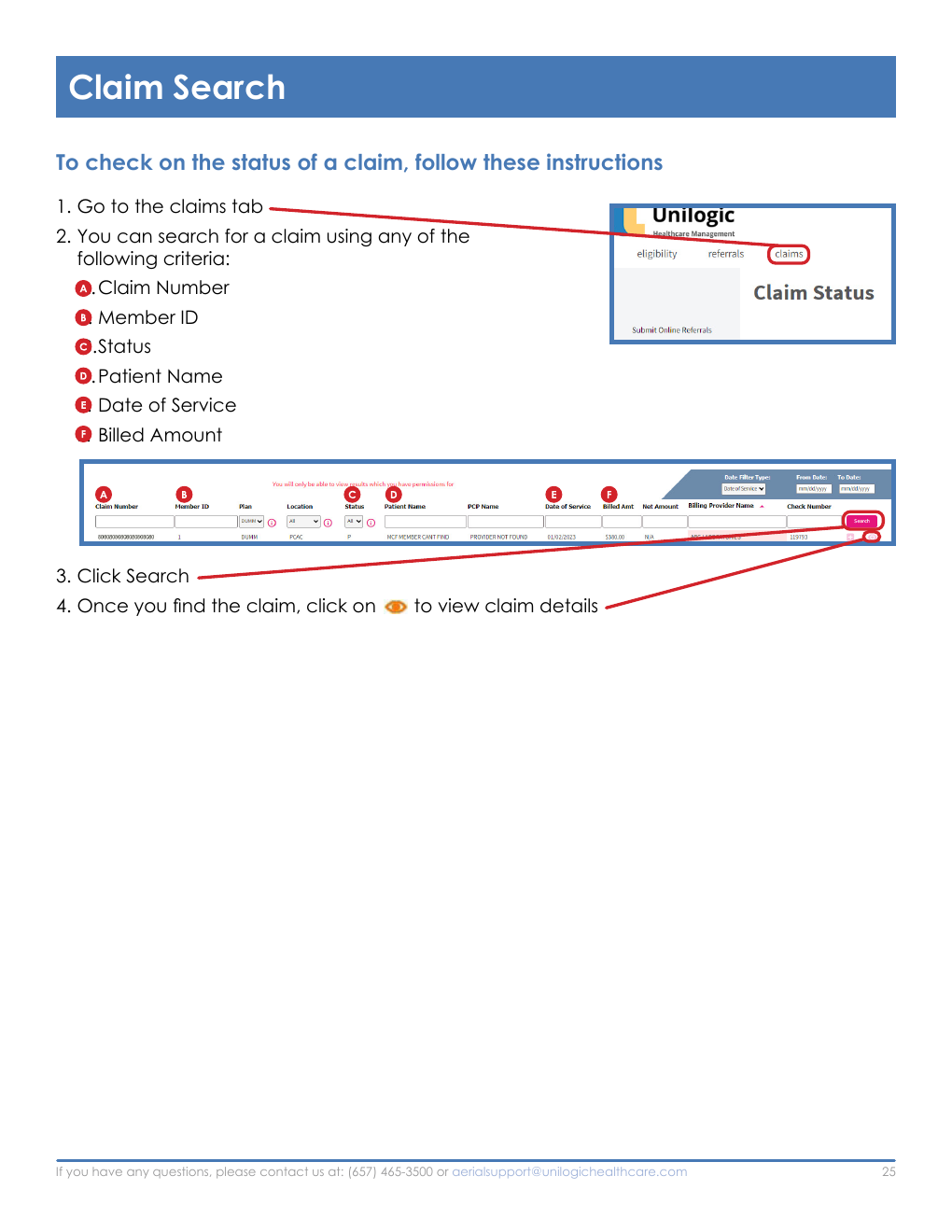
Search for a Claim
- Open the Claims tab.
- Search by claim number, Member ID, status, patient name, date of service, and/or billed amount.
- Select Search.
- Select the eye icon to open Claim Details.
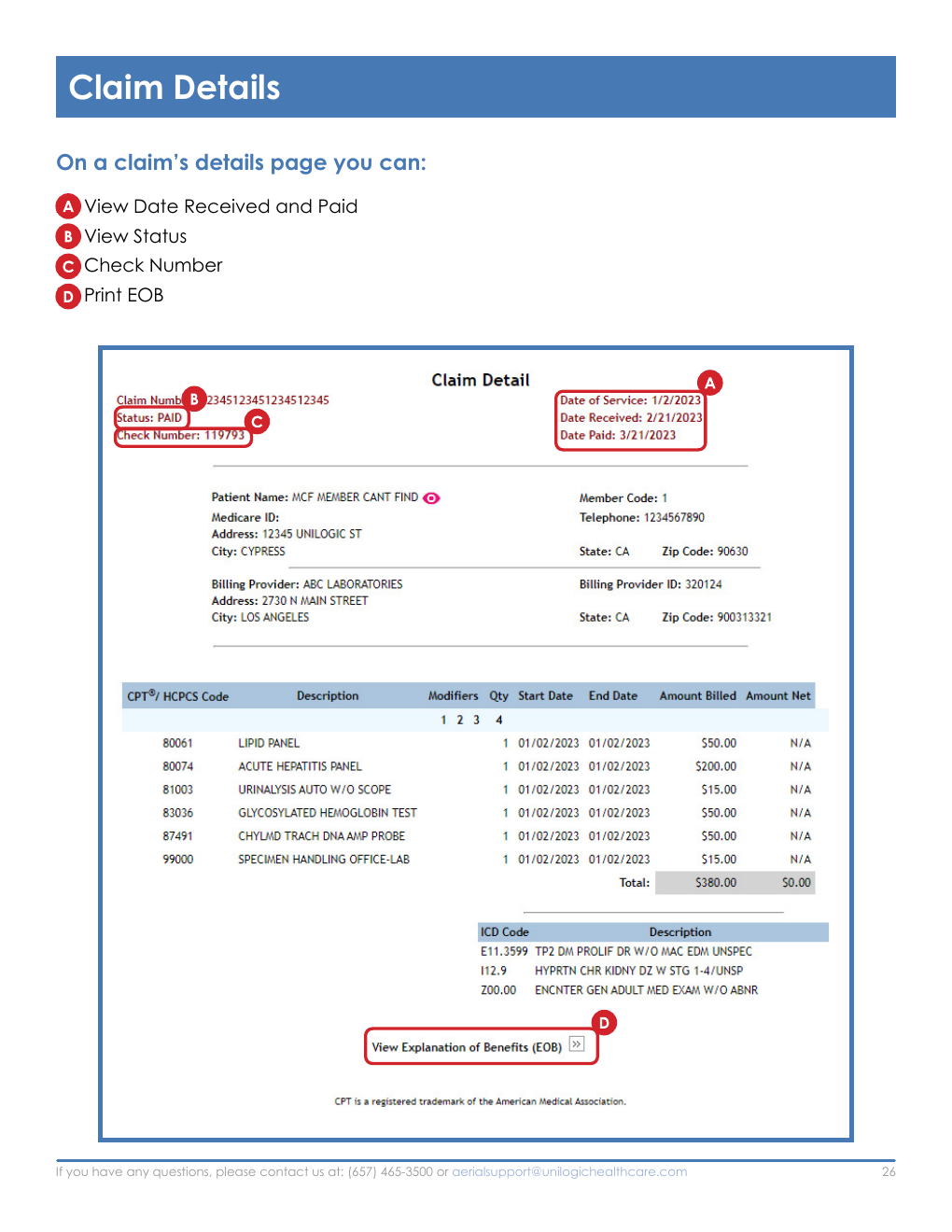
Claim Details shows the received and paid dates, current status, check number, and a link to print the EOB.
Visual Reference: Claim Search
Source screenshot: PCAC Aerial Provider Handbook (September 2025).
Visual Reference: Claim Details
Source screenshot: PCAC Aerial Provider Handbook (September 2025).
Vision Benefits and Eye Exam Routing
| Health Plan | Vision Network | Phone |
|---|---|---|
| Alignment Health Plan | VSP | (800) 877-7195 |
| Anthem Blue Cross | VSP | (800) 877-7195 |
| Astiva Health Care | VSP | (800) 877-7195 |
| Blue Shield | EyeMed Vision | (866) 939-3633 |
| Central Health Plan | EyeMed Vision | (866) 939-3633 |
| Clever Care Health Plan | VSP | (800) 877-7195 |
| Health Net | Premier Eye Care | (855) 353-4910 |
| Humana | EyeMed Vision | (866) 939-3633 |
| Imperial Health | VSP | (800) 877-7195 |
| SCAN | EyeMed Vision | (866) 939-3633 |
| UCLA Health | EyeMed Vision | (866) 939-3633 |
| Wellcare | Premier Eye Care | (855) 353-4910 |
Vision routing questions: qualityincentives@unilogichealthcare.com.
Urgent Care Directory
Verify before directing a patient
The PCAC directory is dated July 17, 2026 and states that the list is subject to change. Call Provider Services at (657) 465-3500 to verify participation and location status.
Los Angeles County
| Center | Address | Phone |
|---|---|---|
| Accelerated Urgent Care | 10401 Santa Monica Blvd, Los Angeles, CA 90025 | (424) 256-0818 |
| Advanced Urgent Care | 797 S Arroyo Pkwy, Pasadena, CA 91105 | (626) 304-0404 |
| AFC Urgent Care | 16912 San Fernando Mission Blvd, Granada Hills, CA 91344 | (818) 488-6160 |
| AME Medical Group Inc | 11525 Brookshire Ave Ste 205, Downey, CA 90241 | (562) 932-6060 |
| AME Medical Group Inc | 11938 Paramount Blvd, Downey, CA 90242 | (562) 923-6060 |
| AME Medical Group Inc | 12472 Washington Blvd, Whittier, CA 90602 | (714) 451-2230 |
| AME Medical Group Inc | 14359 Pioneer Blvd Unit A, Norwalk, CA 90650 | (562) 864-7279 |
| AME Medical Group Inc | 15141 Whittier Blvd Ste 120, Whittier, CA 90603 | (562) 261-5944 |
| AME Medical Group Inc | 3300 E South St Ste 209, Long Beach, CA 90805 | (562) 444-0022 |
| AME Medical Group Inc | 8500 Florence Ave Ste 101, Downey, CA 90241 | (562) 202-5020 |
| Arleta Family Clinic | 9700 Woodman Ave Ste A10, Arleta, CA 91331 | (818) 746-2626 |
| Canoga Park Urgent Care | 20905 Sherman Way, Canoga Park, CA 91303 | (818) 564-4961 |
| Emmanuel Medical Clinic | 7963 Van Nuys Blvd Ste 101, Panorama City, CA 91402 | (818) 988-9818 |
| First Aid Urgent Care | 7204 Foothill Blvd, Tujunga, CA 91402 | (818) 352-8333 |
| First Aid Urgent Care | 9064 Van Nuys Blvd, Panorama City, CA 91402 | (818) 892-9000 |
| Glenoaks Urgent Care Medical Group | 1100 W Glenoaks Blvd, Glendale, CA 91202 | (818) 242-3333 |
| Holy Cross Urgent Care Inc | 4864 Santa Monica Blvd, Los Angeles, CA 90029 | (323) 660-7770 |
| Imperial Primary Care Medical Group | 15625 Imperial Hwy, La Mirada, CA 90638 | (562) 902-3000 |
| Lincoln Heights Urgent Care | 2813 N Broadway, Los Angeles, CA 90031 | (323) 342-9066 |
| Manchester Urgent Care Inc | 6222 W Manchester Ave Ste A, Los Angeles, CA 90045 | (310) 670-0230 |
| Medcove Urgent Care | 20540 E Arrow Hwy Ste B, Covina, CA 91724 | (626) 364-3245 |
| Panorama Urgent Care | 14457 Roscoe Blvd, Panorama City, CA 91402 | (818) 810-5947 |
| Rapid Response Urgent Care | 17559 Chatsworth St, Granada Hills, CA 91344 | (818) 923-5213 |
| Reddy Urgent Care | 1196 N Park Ave, Pomona, CA 91768 | (909) 623-4050 |
| Reseda Urgent Care | 6830 Reseda Blvd, Reseda, CA 91335 | (818) 996-4888 |
| Tarzana Medical Urgent Care | 18055 Ventura Blvd, Encino, CA 91316 | (818) 881-8117 |
| The Urgent Care at Vermont | 1234 N Vermont Ave, Los Angeles, CA 90029 | (323) 660-0831 |
| TotalCare Walk In | 4784 Peck Rd Ste A, El Monte, CA 91732 | (626) 205-1555 |
| Urgent Care Center of South Bay | 4305 Torrance Blvd Ste 106, Torrance, CA 90503 | (310) 542-9758 |
| Valley Urgent Care | 9335 Reseda Blvd Ste 100, Northridge, CA 91324 | (818) 349-9966 |
| Van Nuys Urgent Care Family Medicine | 7211 Van Nuys Blvd, Van Nuys, CA 91405 | (818) 988-2722 |
Orange County
| Center | Address | Phone |
|---|---|---|
| Advance Urgent | 1401 W 1st St Ste 101, Santa Ana, CA 92703 | (714) 542-9700 |
| Sunrise Multispecialist Medical Center | 867 S Tustin St, Orange, CA 92866 | (714) 771-1420 |
| Total Care Walk In | 14775 Jeffrey Rd Ste C, Irvine, CA 92618 | (949) 200-7001 |
Riverside County
| Center | Address | Phone |
|---|---|---|
| Accelerated Urgent Care | 28110 Clinton Keith Rd, Murrieta, CA 92563 | (951) 436-0777 |
| Accelerated Urgent Care | 29400 Rancho California Rd, Temecula, CA 92591 | (951) 595-8282 |
| Accelerated Urgent Care | 29997 Canyon Hills Rd Ste 1604, Lake Elsinore, CA 92532 | (951) 409-9966 |
| Accelerated Urgent Care | 36290 Hidden Springs Rd Ste D-E, Wildomar, CA 92595 | (951) 483-2020 |
| Accelerated Urgent Care | 41540 Winchester Rd, Temecula, CA 92590 | (951) 365-5585 |
| CMG Express Care Inc | 6859 Magnolia Ave Ste 1, Riverside, CA 92506 | (951) 824-7887 |
| Corona Doctors Medical Clinics | 1820 Fullerton Ave Ste 120, Corona, CA 92881 | (951) 371-9500 |
| Desert Urgent Care | 1293 6th St, Coachella, CA 92236 | (760) 341-8800 |
| Heacock Health Medical Group | 24060 Fir Ave Ste A, Moreno Valley, CA 92553 | (951) 247-8005 |
| Ironstone Medical Clinic | 4121 Brockton Ave Ste 104, Riverside, CA 92501 | (951) 778-0032 |
| Medicross Clinic & Urgent Care | 487 Magnolia Ave Ste 102, Corona, CA 92879 | (951) 272-5900 |
| Moreno Valley Urgent Care Inc | 24318 Hemlock Ave Ste E1, Moreno Valley, CA 92557 | (951) 243-5050 |
| Rapid Care Enterprises Inc | 126 Avocado Ave Ste 102, Perris, CA 92571 | (951) 490-4910 |
| Rapid Care Enterprises Inc | 25125 Sunnymead Blvd Ste BB, Moreno Valley, CA 92553 | (951) 490-4910 |
| Rapid Care Enterprises Inc | 6350 W Ramsey St Ste Q, Banning, CA 92220 | (951) 490-4910 |
| Totalcare Walk In Clinic Inc | 13334 Limonite Ave Ste 130, Eastvale, CA 92990 | (951) 407-1460 |
| Totalcare Walk In Clinic Inc | 1973 Foothill Pkwy Ste 104, Corona, CA 92881 | (951) 460-2300 |
| VIP Urgent Care | 100 S Sunrise Way Ste A, Palm Springs, CA 92262 | (760) 969-5999 |
| VIP Urgent Care | 72630 Fred Waring Dr Ste 101, Palm Desert, CA 92260 | (760) 674-1923 |
| VIP Urgent Care | 81930 US Hwy 111, Indio, CA 92201 | (760) 676-9001 |
San Bernardino County
| Center | Address | Phone |
|---|---|---|
| Accelerated Urgent Care | 4108 Edison Ave Ste 112, Chino, CA 91710 | (909) 334-4545 |
| Advanced Medical and Urgent Care Center | 974 W Foothill Blvd, Upland, CA 91786 | (909) 981-2273 |
| Totalcare Walk In Clinic Inc | 13768 Roswell Ave Ste 118, Chino, CA 91710 | (909) 591-8200 |
| Totalcare Walk In Clinic Inc | 2097 E Washington St Ste C, Colton, CA 92324 | (909) 253-0841 |
| West Point Medical Center Urgent Care | 1800 Medical Center Dr Ste 99, San Bernardino, CA 92411 | (909) 880-6400 |
| West Point Medical Center Urgent Care | 7774 Cherry Ave, Fontana, CA 92336 | (909) 355-1296 |
| West Point Medical Center Urgent Care | 8520 Archibald Ave Bldg 20 Ste, Rancho Cucamonga, CA 91730 | (909) 481-3909 |
| Yucca Valley Urgent Care | 58471 29 Palms Hwy Ste 303, Yucca Valley, CA 92284 | (760) 365-0851 |
San Diego County
| Center | Address | Phone |
|---|---|---|
| AFC Urgent Care | 10538 Mission Gorge Rd Ste 100, Santee, CA 92071 | (619) 456-0033 |
| AFC Urgent Care | 1740 Rosecrans St, San Diego, CA 92106 | (619) 790-7800 |
| AFC Urgent Care | 5671 Balboa Ave, San Diego, CA 92111 | (858) 800-2880 |
| AFC Urgent Care | 760 Otay Lakes Rd, Chula Vista, CA 91910 | (619) 821-2300 |
| AFC Urgent Care | 8260 Mira Mesa Blvd Ste A, San Diego, CA 92126 | (858) 900-3550 |
| AFC Urgent Care | 8590 Rio San Diego Dr Ste 111, San Diego, CA 92108 | (619) 736-4600 |
| Eastlake Urgent Care | 2436 Fenton St Bldg 6, Chula Vista, CA 91914 | (619) 581-0509 |
| MD Today Urgent Care | 10605 Scripps Poway Pkwy Ste C, San Diego, CA 92131 | (858) 720-0554 |
| MD Today Urgent Care | 3830 Valley Centre Dr Ste 702, San Diego, CA 92130 | (858) 720-0554 |
| Medplus Urgent Care | 617 E Alvarado St, Fallbrook, CA 92028 | (760) 451-6636 |
| Palm Urgent Care | 505 N Mollison Ave Ste 203, El Cajon, CA 92021 | (619) 354-4694 |
| Southbay Urgent Care | 1628 Palm Ave, San Diego, CA 92154 | (619) 591-9999 |
Ventura County
| Center | Address | Phone |
|---|---|---|
| 1st Stop Urgent Care & Family Center | 2275 Las Posas Rd, Camarillo, CA 93010 | (805) 388-3732 |
Annual Health Assessment (AHA) Documentation Guide
The AHA form is a five-page documentation tool. Complete all items that apply to the member, document results in the chart, and do not submit incomplete measures. The provider certifies completion with a signature and date.
No pending entries
For senior and diabetes measures, include the order date or captured date. The form specifically instructs staff not to leave measures pending.
Patient and Visit Information
- Date, patient name, date of birth, and health plan.
- Temperature, blood pressure, heart rate, height, weight, and BMI.
- Gender, allergies, PCP, marital status, and education level.
- Immunization record status, including ACIP yes/no.
- Work history and measure qualification/codes.
Senior and Preventive Measures (Items 1-8)
| Measure | Population/Frequency | Required Documentation |
|---|---|---|
| 1. Flu vaccine | All ages, yearly | Record vaccination date; G0008 or previously G8482. |
| 2. Pneumococcal vaccine | Age over 60 | Record vaccination date; G0009 or previously 4040F. |
| 3. Colorectal cancer screening | Age 50-75 | Colonoscopy every 10 years (G0105), sigmoidoscopy every 5 years (G0104), or annual FOBT (G0328); ICD-10 Z12.11. Record date, result, and normal/abnormal/polyp status. Mark not applicable for history of colon cancer or status post colectomy. Approximate dates are acceptable, but the year is required. |
| 4. Breast cancer screening | Women age 40-74, every 2 years | Record mammogram date; ICD-10 Z12.31 and 3014F. Mark not applicable for bilateral mastectomy or history of breast cancer. |
| 5. Hypertension control | Age 18-85, annually | Document blood pressure below 140/90 mm Hg, the reading, and date; codes 3074F-3078F. The progress note must include an HTN diagnosis. |
| 6. BMI/obesity | Age 18-74, annually | Record BMI and date; 3008F and Z68 series. |
| 7. Osteoporosis | Women age 65-85 who suffered a fracture | Record bone density scan date. |
| 8. Rheumatoid arthritis | Applicable members | Verify RA diagnosis, document whether an HIV-positive exclusion applies, and record the disease-modifying antirheumatic drug (DMARD) and date when applicable. |
Care of Older Adults (Items 9-12)
| Measure | Documentation |
|---|---|
| 9. Medication list and review | Yes/no and date; codes 1159F and 1160F. |
| 10. Pain assessment | If yes, record date, location, and pain level from 1-10; code 1125F. If no, record date; code 1126F. |
| 11. Functional status assessment | Document that activities of daily living were assessed, with date; code 1170F. |
| 12. Advance directives | If on file, record yes/date; code 1157F. If not on file, document discussion with the patient and date; code 1158F. |
Diabetes Measures (Items 13-17)
Complete these annually for applicable members age 18-75. Record the date a test was captured or ordered; do not leave the item pending.
| Measure | Documentation |
|---|---|
| 13. LDL below 100 mg/dL | Record LDL value and laboratory date; codes 3048F-3050F. |
| 14. Diabetic retinal exam | Record exam date and the optometrist or ophthalmologist's name; codes 2022F-2026F, 2033F, and 3072F. |
| 15. HbA1c below 9.0% | Record HbA1c percentage and laboratory date; codes 3044F, 3051F, 3052F, and 3046F. |
| 16. Microalbuminuria | Record laboratory date and positive/negative result; codes 3061F and 3062F. Alternatively, document ACE inhibitor or ARB use and date. |
| 17. Blood pressure below 140/90 mm Hg | Record reading and measurement date; codes 3074F-3078F. |
Medication Management and Adherence (Items 18-22)
| Measure | Documentation |
|---|---|
| 18. Statin treatment for diabetes | Age 40-75, annually, for members with diabetes. Record current statin yes/no, whether a 90-100 quantity x3 was prescribed, and whether statin use is inappropriate for the member. The form notes that members with diabetes should be on statins. |
| 19. Statin treatment for cardiovascular disease | Men age 21-75 and women age 40-75, annually. Record current statin yes/no, whether a 90-100 quantity x3 was prescribed, and whether statin use is inappropriate. |
| 20. RAS antagonist adherence | Age 18 and older, annually. Record member education yes/no and whether a 90-100 quantity x3 was prescribed. |
| 21. Oral diabetic medication | Age 18 and older. Record member education yes/no and whether a 90-100 quantity x3 was prescribed. |
| 22. Statin adherence | Age 18 and older, annually. Record member education yes/no and whether a 90-100 quantity x3 was prescribed. |
Functional and Cognitive Assessments
Functional status fields include:
- Transportation: drives self, bus, taxi, or driven by others.
- Ability to administer medication independently.
- Housework, meal preparation and serving, grocery shopping, and laundry.
- Ambulation: walks independently, walks with assistance, walker, cane, partial dependence, complete dependence, or bedridden.
Cognitive status fields record whether the member is oriented and alert, has a memory deficit, and demonstrates immediate recall.
PHQ-9 Depression Screening
Ask how often each issue occurred during the prior 14 days. Score each response as not at all (0), less than one week (1), more than one week (2), or daily (3).
| Item | PHQ-9 Question |
|---|---|
| 1 | Feeling down, depressed, hopeless, or helpless. |
| 2 | Little interest or pleasure in daily activities. |
| 3 | Feeling tired or having little or no energy. |
| 4 | Trouble falling or staying asleep, or sleeping too much. |
| 5 | Trouble concentrating on reading, magazines, television, or other tasks. |
| 6 | Feeling bad about oneself, feeling like a failure, or feeling that one has let oneself or family down. |
| 7 | Poor appetite or overeating. |
| 8 | Moving or speaking more slowly than others notice, or restlessness/fidgeting and moving more than usual. |
| 9 | Thoughts of being better off dead or of self-harm. |
| Total Score | Interpretation |
|---|---|
| 0-4 | No depression |
| 5-9 | Mild depression |
| 10-14 | Moderate depression |
| 15-19 | Moderate to severe depression |
| 20-27 | Severe depression |
History, Review, and Examination
| Section | Required Information |
|---|---|
| Chief complaint/history of present illness | Document the current complaint and history. |
| Current medications | List each medication and dosage. |
| Family history | Record cancer, diabetes, heart disease, and hypertension for father, mother, children, siblings, and grandparents. |
| Past medical history | Document relevant diagnoses and history. |
| Social history | Drug or alcohol abuse/dependence; smoking past/current and packs; Pap smear; sexual history; high-risk lifestyle; nutrition counseling; and whether education was provided. |
| Surgical history | For each procedure, record reason, date, and surgeon/facility. |
| Review of systems | General appearance; eyes; ear, nose, mouth, throat, and neck; cardiovascular; respiratory; gastrointestinal; urinary; skin; neurological; and lymphatic. |
| Physical exam and screening | Prostate, lung, cervical/vaginal, STD, TB, abdominal aneurysm, hepatitis B, and hepatitis C screening, with dates where applicable. |
| Laboratory values | WBC, hemoglobin, hematocrit, platelets, GFR, HbA1c, PSA, and date of laboratory testing. |
| Care team | List specialists, suppliers, and other providers involved in care. |
Diagnosis Coding and Care Plan
The final AHA page provides eight repeated problem entries. For each applicable diagnosis, record the code, select the status (active/stable, acute, declining, or resolved), and document the plan and current prescription. Complete the provider signature, credentials, and date, plus the page-level provider signature and date fields.
Provider Certification
By signing, the provider certifies that all applicable services on the form were performed, the results were documented in the member's chart, and incomplete measure information may not be counted by PCAC IPA or the associated health plan.
AHA questions: qualityincentives@unilogichealthcare.com.
Browser Troubleshooting
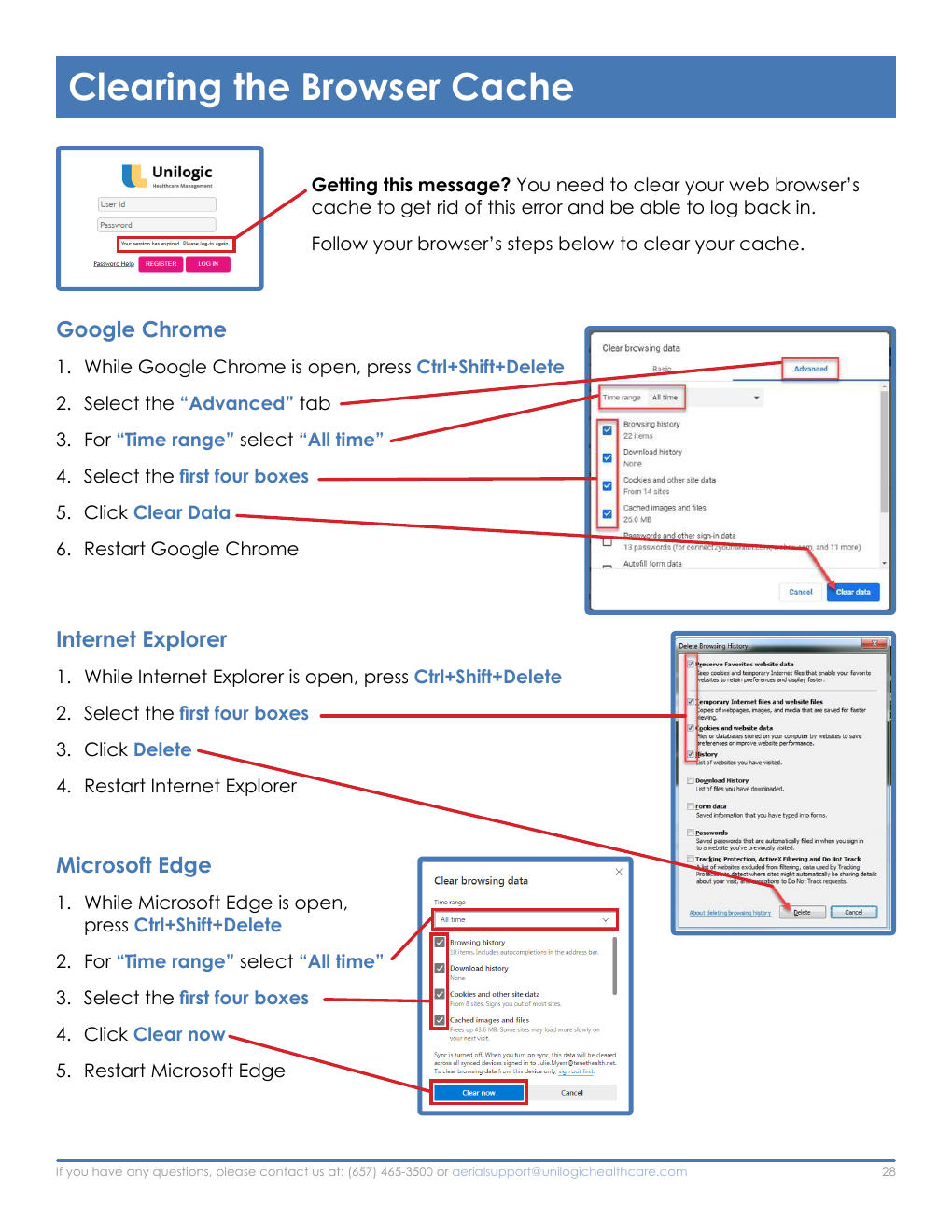
If Aerial displays a login or cache-related error, clear the browser cache and restart the browser.
| Browser | Steps |
|---|---|
| Google Chrome | Press Ctrl+Shift+Delete; open Advanced; set Time range to All time; select the first four boxes; select Clear data; restart Chrome. |
| Microsoft Edge | Press Ctrl+Shift+Delete; set Time range to All time; select the first four boxes; select Clear now; restart Edge. |
| Internet Explorer (legacy source instruction) | Press Ctrl+Shift+Delete; select the first four boxes; select Delete; restart Internet Explorer. |
Visual Reference: Clearing the Browser Cache
Source screenshot: PCAC Aerial Provider Handbook (September 2025).
Source Documents
- PCAC Quick Reference Guide (July 2026).
- PCAC Aerial Provider Handbook (updated September 2025).
- PCAC Eligibility Guide (updated September 2025).
- PCAC Urgent Care Centers directory (July 17, 2026).
- PCAC Optometry Vendors guide (effective January 1, 2026).
- PCAC Annual Health Assessment Form (five pages).
Included PDF Attachments
Download the original PCAC source PDFs below:
- 2026.07_Quick Reference Form.pdf
- 2026.07_Aerial Handbook 09.29.25.pdf
- 2026.07_Eligibility Guide.pdf
- 2026.07_Urgent Care - Providers 07.20.26.pdf
- 2026.07_Vision_Providers 01.01.26.pdf
- AHA FORM.pdf
This consolidated article reflects the information in the included PDFs. Verify changing network, contact, and portal information before operational use.
Comments (0)