
We use the supplier term for all the auxiliary services that we use to treat our Patients. This includes the imaging company, the Pharmacist, lab and other suppliers. There are a lot of synergy between our suppliers and us and it is important to put energy into those relationships. All suppliers we use know of our system and have access to the Patient records that we create the order for. We can chat with them and much more. Look below for how to make a supplier and what abilities they have.
📚Resources Needed
🚀 Tips & Tricks
-
When creating an order, only suppliers that are added in this page will show as an option.
- The supplier will receive an email for each order that is sent and will be able to get access to our system. They can see the orders page for orders that have been sent to them, they can message us and the Patient, and can see the Patient records for the Patients we have sent them orders for.
📘 Instructions
- Login to besa EHR using your credentials.
- Click on the image in the top right corner and select Settings.

- Go to the Suppliers tab to see the supplier list.
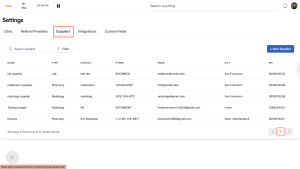
- From here, you can see all the different suppliers that we have and work with. Keep in mind that we do not just add suppliers. These are partners that we have come to agreements with on the level of care we expect when treating our Patients. We also expect real time updates and communication which is why they have a supplier profile in our system.
- To create a new supplier, click on the + Add New Supplier button.

- The create supplier pop-up will appear through the slide in.

- All fields with the * are required and must be completed.
- For this always double check to make sure the information is correct. The supplier will be able to create their account and view the documents we send by completing a form which covers all the information in this create supplier form.
Here is a video to help you better understand.
If you have any questions or would like more information, please reach out to support.
Comments (0)