
Our team members are everything. They are what allow us to keep working towards our goals. Remember, no one cares about you, we care about the person next to you. That being said, be It is nice to know how the Care Team area of the platform works just in case you want to know something more about your team members.
📚Resources Needed
🚀 Tips & Tricks
-
Most of all the information you need to know about our team members can be found on this page.
-
If someone wants to edit their personal information they can do so in the Staff page, as well as the Profile page.
- Depending upon the specialty and the location, the provider will appear for a possible appointment. Example: A provider that has a dermatology specialty will show for dermatology appointments and not for cardiology appointments.
📘 Instructions
- Login to besa EHR using your credentials.
- Click on the Team Member card in the navigation icon or Dashboard page.
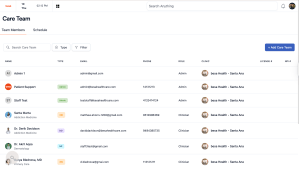
- You will see this page which lists all your team members.
-
To view details you can click on the name of the team member and the details will show.

-
To create a new team member click on the + Add Care Team button

- The pop-up slide in form will appear for you to create a team member.

- All fields with a * are required fields and must be filled in.
- Keep in mind that all this information can be found in the team member onboarding forms that all team members complete before working with us to go through background check.
If you have any questions or would like more information, please reach out to support.
Comments (0)